

Why User Feedback is the Missing Link in Onboarding
Most onboarding flows are designed for users—but what if they were built with them?
Many teams still rely on assumptions and templates instead of listening directly to users. As a result, friction points remain hidden, and activation rates suffer. That’s where user feedback becomes invaluable. When you consistently collect and analyze onboarding feedback, you gain real-time insight into what new users find confusing, time-consuming, or delightful. For instance, if multiple users mention that a setup form feels long or unclear, that single piece of feedback reveals exactly where drop-offs begin.
By treating feedback as data instead of opinion, you can transform onboarding from a static checklist into a responsive, user-shaped experience. This blog shares practical methods to collect user feedback, interpret it effectively, and turn those insights into a friction-free onboarding journey that improves activation, satisfaction, and retention.
The Importance of User Feedback in Onboarding Success
The onboarding experience often defines whether a user continues exploring your product or quietly disengages. Yet, most onboarding flows are built on assumptions—internal hypotheses, outdated personas, or static user journeys. In reality, what users need during onboarding evolves rapidly, and only user feedback can reveal those shifting expectations in time.
Collecting feedback early often allows teams to understand what’s working, what’s confusing, and what’s missing from the user journey. For example, if multiple users mention they couldn’t find a “Save progress” button or that setup instructions felt unclear, that insight pinpoints a moment of friction you can immediately fix.
When feedback is integrated into onboarding decisions, it turns the process into a living system that adapts with every cohort. SaaS platforms like Notion and ClickUp, for instance, use continuous feedback loops to refine walkthroughs, simplify complex steps, and ensure users hit activation milestones faster.
Ultimately, the importance of user feedback lies in its ability to close the gap between what you think users experience and what they actually experience. It’s not just a diagnostic tool—it’s your blueprint for improving onboarding completion rates, satisfaction, and retention.
How User Feedback Aligns Onboarding with Real User Needs
Collecting user feedback is one of the fastest ways to uncover whether your onboarding flow truly helps or hinders new users. While analytics highlight where people drop off, feedback explains why they do. When you actively listen to users, you bridge the gap between perceived and actual needs—ensuring the onboarding experience reflects reality, not assumption.
Consider this simple example: after analyzing onboarding feedback, a B2B SaaS platform discovered that many users hesitated at the “Integrations Setup” step because the form didn’t clarify required fields. That single insight led the team to add contextual tooltips and a visual checklist. The result? A 23 % increase in step completion and a noticeable rise in activation rates.
These user feedback examples demonstrate that collecting feedback during onboarding isn’t just a survey exercise—it’s an ongoing calibration process. By observing what users say in open-text comments, in-app prompts, or follow-up surveys, you can adjust your content hierarchy, messaging clarity, and navigation flow. Over time, each iteration compounds into an experience that feels intuitive, helpful, and aligned with user intent.
Key Benefits of Collecting User Feedback During Onboarding
Effective onboarding isn’t just about getting users started—it’s about understanding why they stay or leave. The benefits of user feedback extend far beyond usability tweaks; they transform your onboarding flow into a data-driven, continuously improving experience.
Reduced Drop-Off Rates
One of the biggest benefits of collecting user feedback is identifying friction points that analytics alone can’t explain. When users share why they abandon a step—“the setup form is confusing,” or “the tutorial video was too long”—you gain immediate insight into where to act. For instance, a productivity SaaS noticed users repeatedly abandoning the integration setup page. After gathering in-app feedback, they simplified the layout and clarified field labels, reducing drop-offs by 30 % within two weeks.
Improved Activation Metrics
Feedback helps pinpoint barriers that stop users from reaching activation milestones. When new customers explain what feels unclear or time-consuming, those insights directly guide experience optimization.
Example: A project-management platform learned from user feedback that the “Create your first task” step felt unnecessary to experienced users. By allowing them to skip it, activation rates increased because advanced users reached core features faster.
Higher User Satisfaction and Loyalty
When users see their feedback reflected in product updates, it reinforces trust and ownership. Communicating improvements—such as “We simplified onboarding based on your suggestions”—signals respect for their input. This small gesture builds long-term loyalty, improving Net Promoter Scores (NPS) and reducing churn. Ultimately, the importance of user feedback lies in creating a shared loop of dialogue and value exchange between brand and customer.
How to Collect and Incorporate User Feedback into the Onboarding Experience
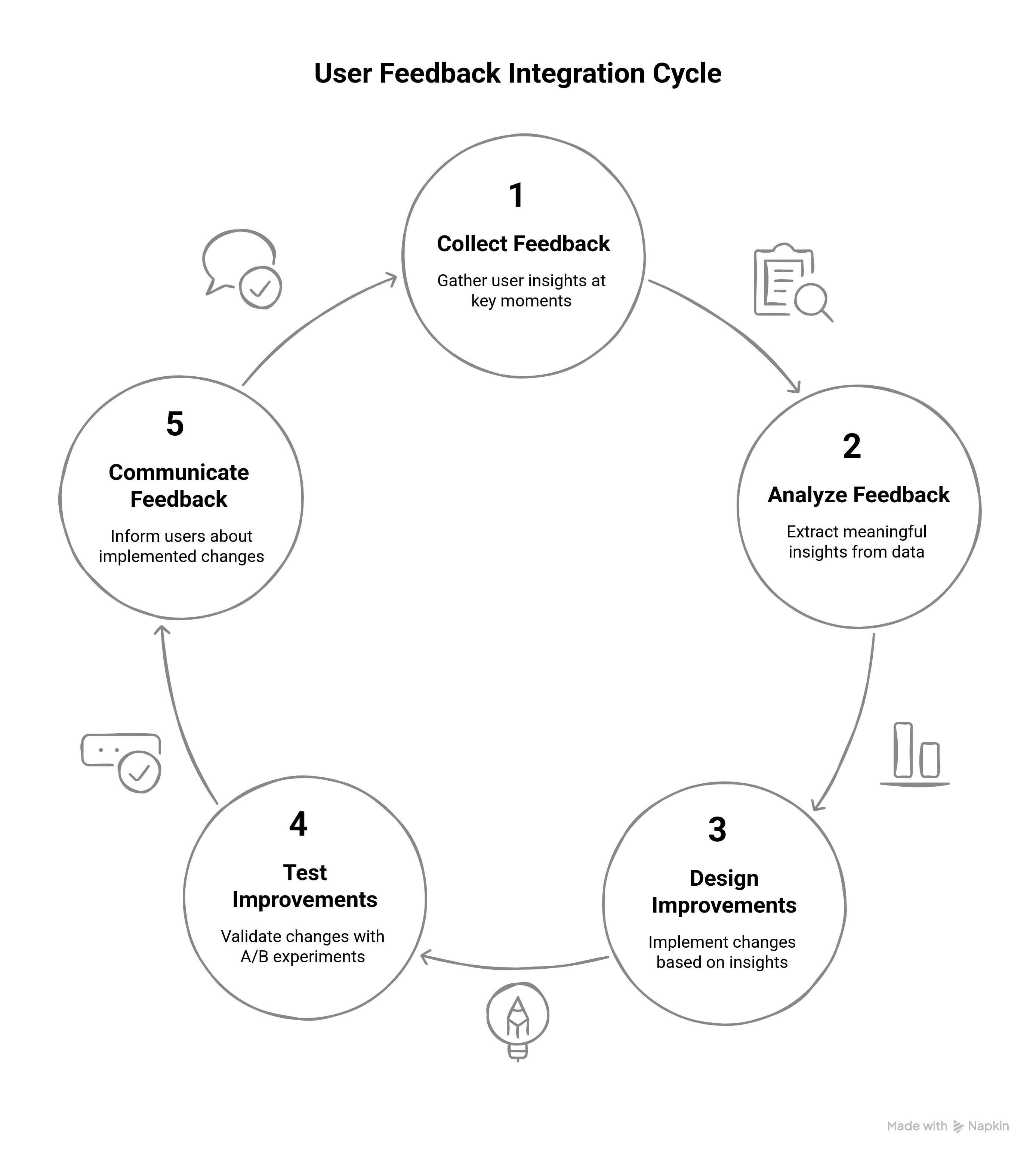
Incorporating user feedback into onboarding is not just about gathering opinions — it’s about turning real insights into measurable improvements. Below is a detailed process showing how to collect user feedback effectively and use it to create a seamless, user-centered onboarding experience.
Step 1: Collect Feedback at Key Onboarding Touchpoints
The best feedback comes at moments when users are most engaged — during sign-up, setup, or immediately after completing key tasks.
Where to Collect Feedback:
- After Sign-Up: Ask quick questions like, “Was the registration simple?” or “What could we improve?”
- During Tutorials or Guided Steps: Use in-app prompts such as “Was this explanation clear?” to capture real-time friction.
- Post-Onboarding: Once users finish setup, trigger a short NPS or satisfaction survey.
Feedback Collection Methods:
- In-App Micro-Surveys: Ask one or two focused questions; e.g., “How easy was this step?”
- Behavioral Tracking: Identify friction points from analytics (e.g., drop-offs on certain pages).
- Real-Time Prompts: Tooltips or modals asking, “Was this step helpful?”
User Feedback Example: A CRM platform like HubSpot discovered through in-app surveys that users were confused by its contact import step. A tooltip clarification improved completion by 20% within a week.
Step 2: Centralize and Analyze Feedback
Collecting user feedback is only half the work; the real value comes from analysis.
How to Centralize:
- Aggregate data from multiple channels — in-app surveys, support tickets, analytics tools.
- Categorize by theme: navigation, clarity, redundancy, or setup complexity.
How to Analyze:
- Use heatmaps and session recordings to visualize confusion points.
- Employ sentiment analysis or NLP tools to identify recurring pain phrases like “too many steps” or “unclear.”
- Prioritize by frequency and impact — fix what affects the largest group first.
User Feedback Example: An e-commerce SaaS noticed users repeatedly hovered over a “Next” button without clicking. Heatmaps revealed that the button label didn’t match their expectation. Renaming it to “Continue Setup” boosted progression rates immediately.
Step 3: Design Feedback-Driven Improvements
Once insights are clear, translate them into actionable design updates.
Actions to Take:
- Simplify Complex Steps: Break long forms into smaller screens or add progress indicators.
- Add Visual Aids: Tooltips, videos, and contextual FAQs help reduce confusion.
- Segment Solutions: Allow advanced users to skip tutorials, while new users receive guided help.
User Feedback Example: A SaaS scheduling app found that advanced users disliked repetitive tooltips. By adding a “Skip Tour” option, the company improved satisfaction for power users without hurting completion rates.
Step 4: Test and Optimize Using A/B Experiments
Every onboarding improvement should be validated with data.
Run A/B Tests To Measure Impact:
- Compare completion rates, activation metrics, and satisfaction scores before and after changes.
- Track KPIs like time-to-value (TTV) or feature adoption speed.
Iterate Continuously: Even successful changes benefit from refinement. If simplified steps boost completion but not activation, add motivational content that highlights immediate product value.
User Feedback Example: A SaaS HR platform tested two onboarding flows — one guided, one checklist-based. The guided flow drove a 25 % higher activation rate, proving that context-rich steps foster quicker adoption.
Step 5: Close the Loop — Communicate Back to Users
Acknowledging user feedback strengthens loyalty and encourages more honest responses in future cycles.
How to Communicate Updates:
- In-App Announcements: “Thanks to your feedback, we simplified our onboarding steps!”
- Email Updates: “You spoke, we listened — setup now takes 40 % less time.”
- Release Notes or Blog Posts: Highlight major improvements and credit the community.
User Feedback Example: A design tool like Figma sent users an update titled “You Asked, We Simplified!” — showcasing UX refinements driven directly by user comments. The campaign boosted NPS scores significantly.
Personalizing the Onboarding Experience Using User Feedback and AI
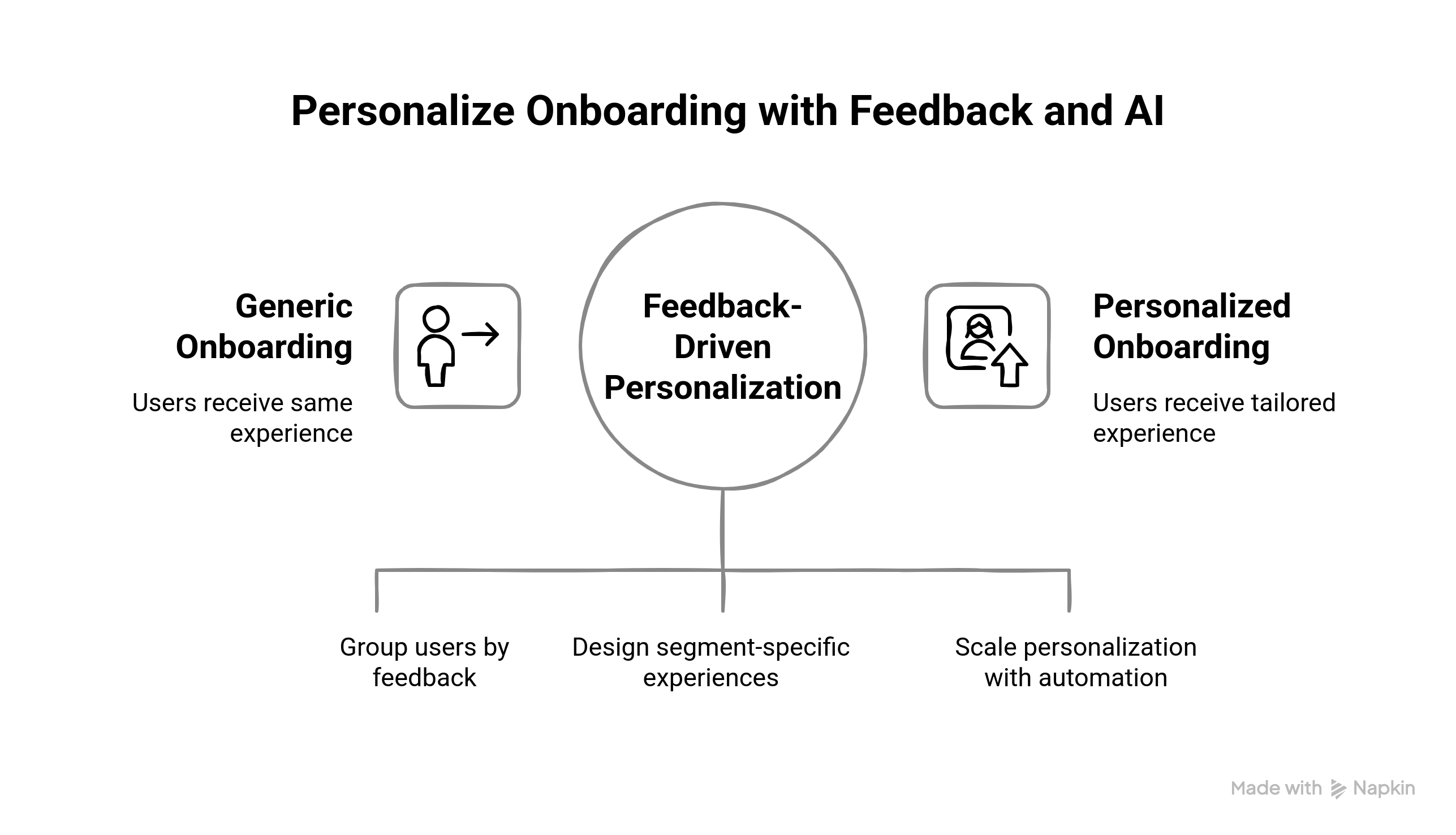
Personalization is where the importance of user feedback truly shines. When you analyze what users say and how they behave, you can craft onboarding journeys that feel designed for each individual. The benefits of user feedback multiply when insights are combined with automation and AI — allowing every new user to see the most relevant content, guidance, and prompts.
Segment Users Based on Feedback and Behavior
Start by segmenting users according to their tone, feedback type, and activity during onboarding.
Segmentation Framework:
- By Sentiment:
- Dissatisfied users → Frustration or confusion (need simplified guidance).
- Neutral users → Functional but disengaged (need value reinforcement).
- Delighted users → Positive tone with suggestions (potential advocates).
- By Experience Level:
- First-time users → Require reassurance and linear progress indicators.
- Experienced users → Prefer shortcuts and optional tutorials.
- By Behavior Patterns:
- Drop-offs → Feedback reveals blockers.
- Quick completers → Ready for advanced features.
User Feedback Example: A SaaS analytics platform categorized feedback sentiment using NLP and identified a segment of frustrated first-time users struggling with dashboard setup. Simplifying that step reduced onboarding time by 18 %.
- By Sentiment:
Tailor the Onboarding Journey for Each Segment
After segmentation, design experiences that directly address the patterns revealed by feedback.
- For Users Struggling with Navigation: Embed contextual walkthrough videos or interactive cues.Example: A project-management tool like Asana could surface a “Create Your First Project” mini-tutorial for confused users.
- For Tech-Savvy or Returning Users: Offer advanced setup options or allow skipping tutorials.Example: A CRM added a “Skip Guided Setup” button, cutting onboarding time for repeat users in half.
- For Specific Pain Points: Use aggregated user feedback examples to create micro-solutions, like in-app FAQs addressing “payment setup” or “integration confusion.”
This ensures users feel understood — a key psychological benefit of personalized onboarding.
Leverage AI to Scale Feedback Personalization
AI transforms static feedback into adaptive onboarding experiences.
How AI Uses Feedback:
- Sentiment Detection: NLP tools scan open-text feedback to classify tone and urgency.
- Behavior Prediction: Machine-learning models anticipate drop-offs based on historical patterns.
- Automated Follow-Ups: Systems trigger personalized actions — sending guides, suggesting next steps, or notifying success managers.
User Feedback Example: An e-learning platform used AI to interpret learner feedback and recommend personalized course playlists. Result: higher completion rates and improved satisfaction scores.
By combining qualitative feedback with behavioral data, AI enables you to respond at scale — ensuring that onboarding evolves dynamically with every user interaction.
Best Tools and Strategies for Collecting and Using User Feedback in Onboarding
Choosing the right tools can make the difference between fragmented feedback and actionable insights. Here’s how to effectively collect, analyze, and apply user feedback throughout the onboarding process — with examples tailored for B2B SaaS teams.
Tools for Collecting User Feedback
Collecting user feedback requires multiple touchpoints — from in-app surveys to post-onboarding follow-ups.
- In-App Surveys (Hotjar, Qualaroo, Typeform): Trigger micro-surveys during onboarding tasks to capture context-specific responses.Example: After completing a guided setup, a tool like Typeform can ask, “Was this tutorial easy to follow?”
- Feedback Widgets (Userback, Survicate): Add a persistent “Give Feedback” button to gather real-time user thoughts.
- NPS Tools (Delighted, AskNicely): Gauge satisfaction post-onboarding with a quick “How likely are you to recommend us?”
These tools simplify how to get user feedback directly from users without interrupting their flow.
Tools for Analyzing and Centralizing Feedback
Once collected, consolidate data from various sources for analysis.
- Analytics & Behavior Tracking (Mixpanel, Amplitude, Google Analytics): Identify where users pause, skip, or drop off.
- Session Recordings (Hotjar, FullStory): Visualize onboarding friction points.
- Heatmaps (Crazy Egg, Mouseflow): Spot where users click or hesitate.
User Feedback Example: An e-commerce SaaS noticed low engagement on a “Start Free Trial” button; heatmap data led to a copy change that doubled clicks.
The importance of user feedback becomes visible when paired with behavioral data — you see both what users say and what they do.
Tools for Testing and Experimentation
Experimentation ensures you act on feedback intelligently rather than impulsively.
- A/B Testing Platforms (Optimizely, Fragmatic, Adobe Target): Compare different onboarding flows or copy variants.
- Feature Flags (LaunchDarkly, Split.io): Roll out improvements incrementally to specific user cohorts.
- Feedback Loop Testing: During live tests, continue collecting real-time input to refine each version faster.
These help validate whether collecting user feedback translates into meaningful improvements in activation or satisfaction.
Tools for Measuring Impact
Quantify how feedback-driven onboarding influences your success metrics.
- Survey Analytics (SurveyMonkey, Google Forms): Correlate satisfaction scores with completion rates.
- NPS Tracking Tools (Retently, SatisMeter): Monitor sentiment trends post-onboarding.
- Customer Intelligence Platforms (Qualtrics, Gainsight): Combine feedback, engagement, and revenue data for a unified impact view.
User Feedback Example: A SaaS marketing platform used NPS tracking to identify that users' ratings below 6 also failed to complete onboarding. That insight led to early intervention campaigns that improved completion rates by 22 %.
How to Measure the Impact and Benefits of User Feedback in Onboarding
To validate the importance of user feedback, you need metrics that show how it transforms onboarding outcomes. Each feedback loop you create should have a measurable impact — from faster activation to higher satisfaction. Here’s how to track that progress.
Onboarding Completion Rates
- Measure the percentage of users who complete the entire onboarding process.
- Impact: A higher rate indicates that your flow is engaging and free of major friction points.
Activation Rates
- Track the number of users reaching key milestones, such as completing a first task or setting up their profile.
- Impact: Indicates how effectively onboarding helps users achieve initial success.
Time-to-Value
- Measure how quickly users derive value from your product post-onboarding.
- Impact: A reduced TTV shows that onboarding is streamlined and effective.
Net Promoter Score
- Assess user satisfaction and loyalty post-onboarding.
- Impact: Higher scores reflect that users feel confident and supported by your product.
Conclusion
Integrating user feedback into your onboarding process isn’t a nice-to-have — it’s a strategic necessity. Every friction point uncovered, every suggestion implemented, and every micro-interaction improved brings you closer to a truly user-centered experience. The importance of user feedback lies in its ability to turn assumptions into insights and onboarding into a dynamic, evolving system. It transforms a one-time product walkthrough into an ongoing conversation between your brand and its users. When you continuously listen, analyze, and act on what customers say, your onboarding experience becomes more intuitive, inclusive, and rewarding.
The measurable benefits of user feedback — higher activation rates, faster time-to-value, and stronger retention — are proof that engagement begins with empathy. By collecting user feedback throughout the journey and closing the loop transparently, you signal to users that their voice has weight. That’s what builds trust, satisfaction, and advocacy. Ultimately, great onboarding isn’t built for users; it’s built with them. When you align feedback with design, and data with empathy, you don’t just guide users through your product — you guide them toward success.


