

Introduction
Data within b2b SaaS is considered an input, a tool used for gaining a competitive edge. GTM teams have all worked to fine-tune acquisition funnels. From their perspective, to the development teams that need to analyze feature adoption, the need for measuring user behavior with precision and in real time has never been more severe. When there are far too many digital analytics tools flooding the market, each one with a promise of smarter dashboards, deeper segmentation, and cleaner attribution, what will help you separate the signal from the noise? Making a choice for analyzing website analytics software is not a matter of ticking a box; this is the choice that, upon making the right one, shapes your growth for years to come.
B2B SaaS behaviors are not like those of traditional eCommerce or direct-to-consumer channels. One click or session is not enough to convert a buyer in this case. The whole process becomes extremely complicated with many touchpoints and may even take weeks to convert. That is why generic analytics setups seem to fail terribly. Instead, we need purpose-fit B2B SaaS analytics: systems that convert their capture of raw data into real insights against your revenue funnel, sales cycles, or product-led motions. Whether conversion rates from trial to paid, user onboarding, or segmentation onto firmographic data are being analyzed, the right SaaS analytics tools reveal friction, opportunities, and behavioral intent at a micro level.
This blog will provide an in-depth breakdown of what defines good analytics for B2B while comparing features, integrations, compliant capabilities, and long-term scalability of your stack. We will also discuss what makes the marketing-oriented platforms different from the product-oriented analytics engines, and how to ensure that considerations are made well into the future, given the current climate of cookieless tracking and privacy by design architecture. This is your only guide to help you simplify growth, retention, and customer intelligence.
What is a Web Analytics Tool and Why It Matters for B2B SaaS
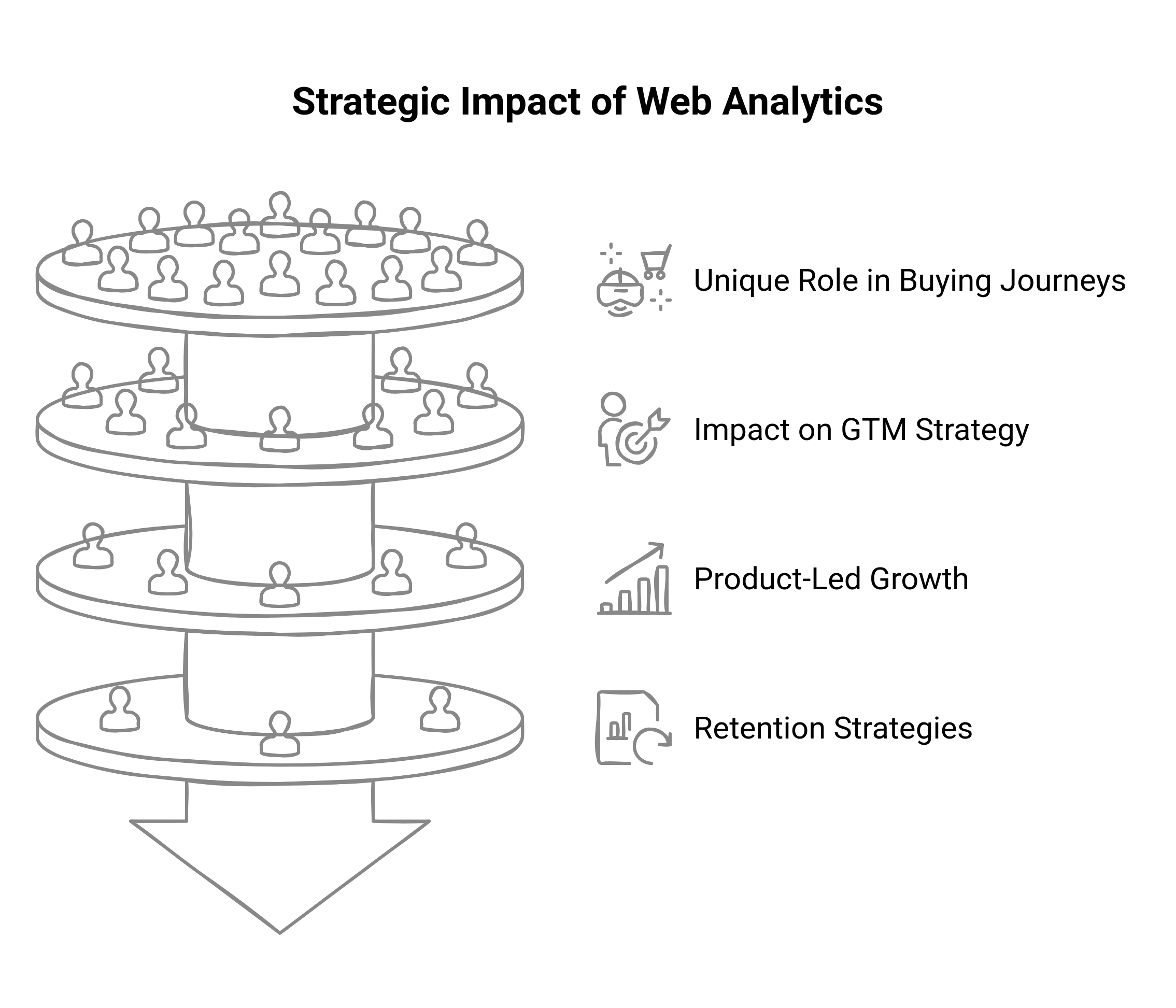
Personally, a web analytics tool, as we have seen over time, is software to collect, measure, and analyze data on how users have interacted with your website or product. But in the B2B SaaS landscape, these definitions go beyond mere page views and bounce rates. These tools do serve as operational intelligence engines for an SaaS enterprise, recording every meaningful event from demo requests and trial sign-ups to product consumption and churn signals. That is why it is not only that visitor counts are needed, but to understand behavior, how to map intent, and tie engagement to revenue impact.
There are hardly any linear ways of purchases in B2B SaaS; the buying journey tends to delegate an account further than a single stakeholder across marketing, IT, and procurement, each one doing things over weeks or months. That is where sophisticated B2B analytics come into play: they continuously obtain information on session data for anonymous and known users, identify over time, and enable visibility into the activity on an account level. This knowledge is crucial for attribution modeling, sales qualification, and behavioral segmentation, particularly in product-led or hybrid GTM models.
Modern SaaS analytics tools do not only cater to the marketing crowd, but rather they inform decisions across the entire go-to-market ecosystem. Marketers use them for the enhancement of campaign performance and lead scoring. Product teams iterate against features and reduce onboarding friction based on usage data. Sales and customer success pull data from the website and in-app activity to personalize outreach and mitigate churn. In essence, the right website analytics software does not merely keep track of your website; it facilitates improved decision-making through the customer lifecycle. For B2B SaaS, this is not optional; this is mission-critical.
Key Features to Look For in a B2B SaaS Web Analytics Tool
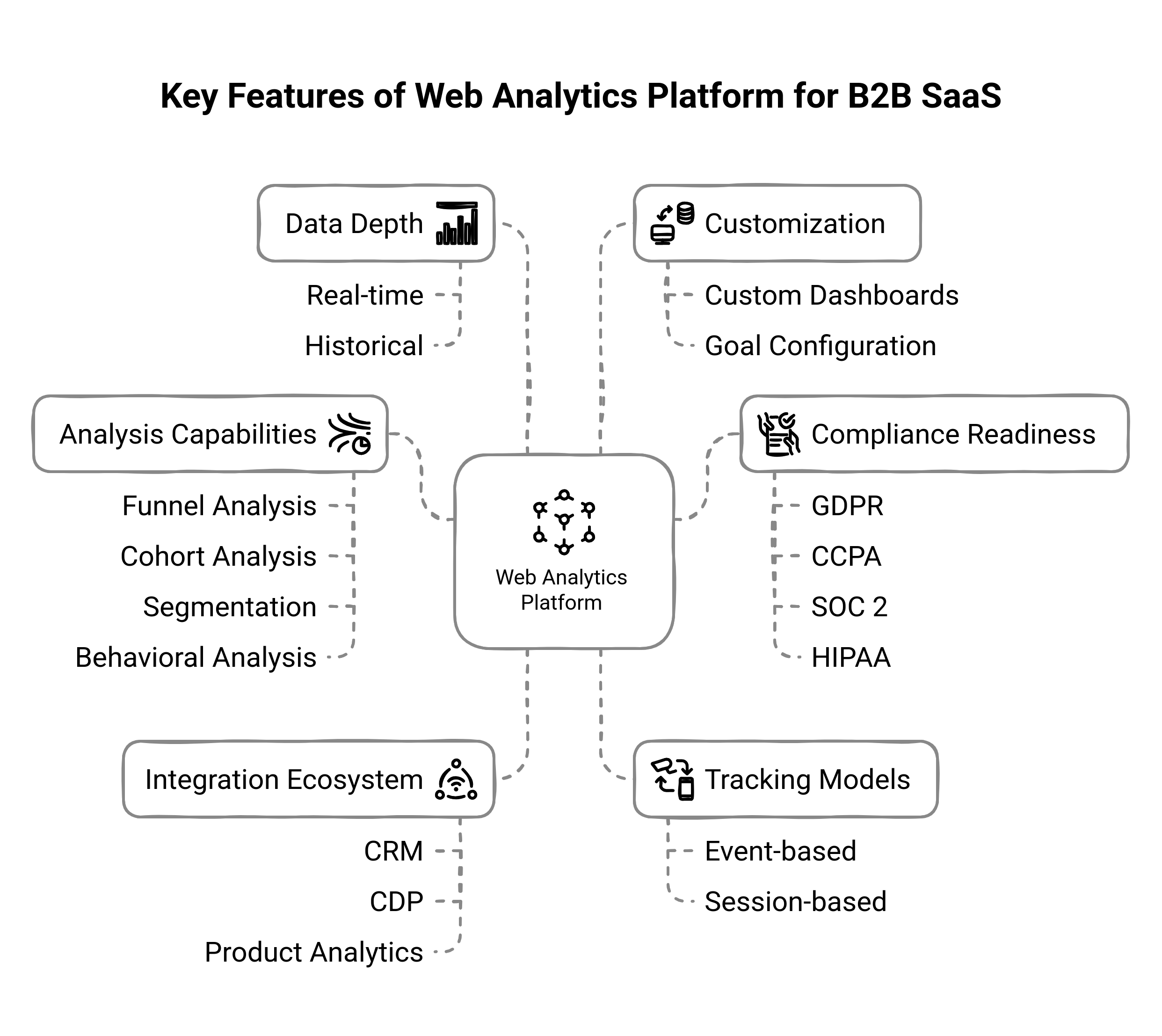
When looking into web analytics tools for a B2B SaaS business, glancing at the feature list won't suffice; you've got to know why all those capabilities matter and how they translate into actionable steps. Here, we will dissect the eight most important features, their real-world importance, and specific questions or tests you can run in evaluation.
Visitor Level Tracking and Multi-Touch Attribution
In B2B environments, deals are closed over weeks or months across numerous people at the firm. Visitor-level tracking allows joining the dots for anonymous browsing sessions by known leads once they convert, while multi-touch attribution keeps track of all marketing touchpoints-from whitepaper download to requesting demos. Tell the vendor to run a demo report to show how a single account's journey is reconstructed through the marketing campaigns, organic search, and direct visits. Ensure that you can switch first-touch, last-touch, and algorithmic attribution models to see how credit moves.
Funnel and Cohorts Analysis Capabilities
Funnels let you visualize drop-off points (e.g., landing page → sign-up → onboarding), while cohorts help you compare groups of users that started at the same time or did the same thing. Together, they are able to tell you where you are losing prospects and which user segments create long-term value.
Create a simple funnel in the tool, for example, “Visit Pricing Page → Sign Up for Trial → Activate Key Feature”. Then create a cohort of users who activated in the first 7 days after sign-up and compare their retention curve against those who didn't. The ability to filter by date and firmographic attributes (industry, company size) should also be configured.
Session-Based vs. Event-Based Tracking Model
While session models group interactions by visit, event models cover every click, form fill, and custom event you define. Session-based is great for high-level traffic insights; event-based is critical when you want to measure specific SaaS behaviors like "the user clicked Invite Team Member" or "the user completed onboarding."
Define three custom events (for example, feature X used, report downloaded, plan upgraded). Instrument these via a tag manager or SDK, then check that the analytics platform is capturing their event creation time, user IDs, and properties (like plan tier).
Real-time vs. Historical Data Depth
Real-time visibility enables the growth team to act quickly at times during peak traffic events-holding warm leads or increased usage. Deep historical data (i.e., 6-12+ months) starts the process of trend analysis, seasonality studies, and long-term benchmarking. Some tools have real-time caps of 1% sampling, or keep the raw data for only 30 days, so be clear about your needs.
Generate a live event (e.g., submit a form) and watch it pop up in the analytics interface within seconds. Then ask to export raw event logs going back at least six months-in an ideal world, with a query interface or direct access via the database.
Segmentation and Behavioral Analysis Granularity
Please remember that "all users" is hardly ever a useful classification. Painfully, one needs to slice by firmographics (industry, company size), technographics (browser, device), behavior (frequency of feature usage), and stages of the life cycle (trial vs. paid). Fine-grained segmentation shows hidden high-value cohorts, directing campaigns.
Create a segment of "trial users from companies with >100 employees who have used Feature Y at least twice in the last week." Confirm you can layer on additional filters traffic source, geo-location, or marketing campaign, and that the tool returns both counts and aggregated metrics (e.g., avg. session duration).
Custom Dashboards and Goal Configuration
Every B2B SaaS team has different measures of success: MRR growth, free-to-paid conversion, and churn rate reduction. Any web analytics tool worth its salt should let you create custom dashboards where you can set alerts for every time metrics go below or above a particular threshold.
Write down three KPIs for your consideration (e.g., weekly demo requests, 30-day trial-to-paid rate, net revenue retention). For the test, recreate these as dashboard widgets and set up an alert (email or Slack) when any metric deviates more than 10%.
API and Integration Ecosystem (CRM, CDP, Product Analytics, among others)
Analytics itself is not a finely tuned silo. The tool must be able to push enriched behavioral data into Salesforce or HubSpot for lead scoring and sync audience segments with your CDP for personalization, as well as integration with product tools (like FullStory) for session replays.
Script an API call to illustrate how your company's REST API and SDKs would function "inside" that context. Ask for a proof-of-concept where a segment you create in the analytics tool-say, "users who hit the checkout page but didn't convert," is automatically sent to your marketing automation platform for retargeting.
Compliance Readiness: GDPR, CCPA, SOC 2, HIPAA (for HealthTech SaaS)
The compliance readiness issues are GDPR, CCPA, SOC 2, and HIPAA (especially for HealthTech SAAS). The implications: B2B SaaS usually deals with sensitive data. GDPR is for an EU customer; it should comply if a business tracks California residents: CCPA; it can even go to the extent that SOC 2 or HIPAA certification may be required in specialty verticals. Non-compliance leaves fines and reputation damage.
The vendor's compliance certifications (e.g., public SOC 2 report) have to be verified, and the processes for supporting data subject requests (right to access, right to be forgotten). You will have to be assured that you can anonymize or pseudonymize data, configure data-retention windows, and host within your region of choice.
How to Align Analytics Capabilities With Your Business Maturity Stage
Not every type of web analytics tool can sufficiently cater to all these stages of growth, so naturally, the B2B SaaS teams should not chase shiny tools but align their analytics maturity with their current scale, go-to-market complexity, and operational readiness. Here's how you can set your analytics stack to get maximum return-whether at an early stage or operating at full scale.
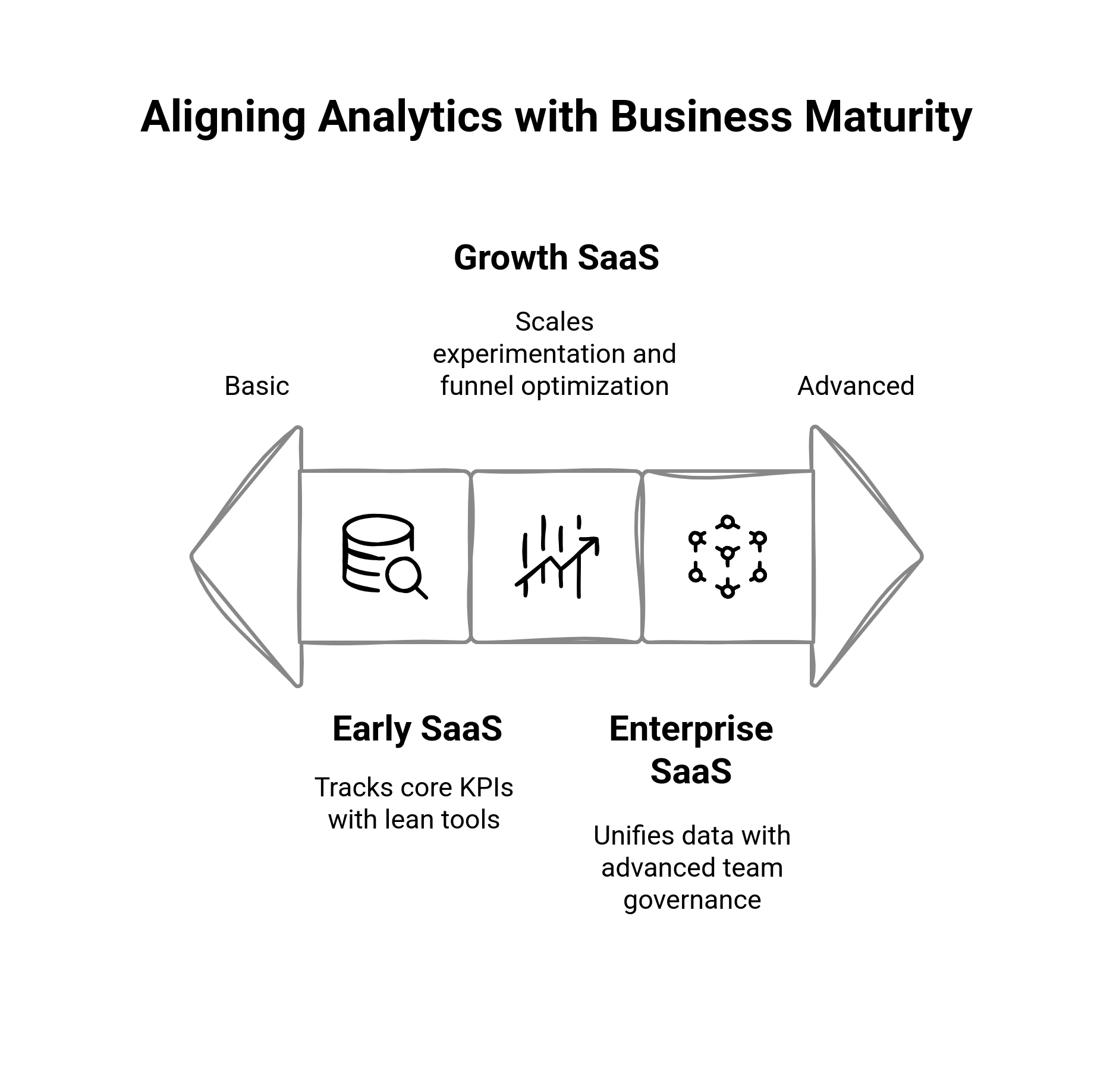
Early SaaS: Tracker of Core KPIs and Lean Tools on PLG Metrics
Now you have to validate product-market fit, build traction, and monitor critical conversion points. This does not imply a heavy tech stack; it implies acquiring a lightweight package analytics easy to set up, and does not need a full-time analyst to operate. These tools should give you visibility into trial signups, activation events, and usage within your PLG funnel. What to prioritize:
Event-based tracking for feature usage (e.g., "created project", "invited team")
Funnel visualizations to diagnose drop-offs
Source attribution for marketing ROI
Live dashboards of KPIs (trial-to-activated, DAUs, retention curve)
Pitfall to Avoid: Over-engineering your stack. Avoid chasing enterprise-grade platforms too soon. Instead, focus on velocity: how fast can you get insights that drive product and growth decisions?
Growth Stage in SaaS: The Scaling Experimentation, Segmentation, and Funnel Optimization
Once you have validated demand and scaled your user base, it is time to begin scaling. In this case, you will probably be looking for the best SaaS analytics tools for experimentation, deeper behavioral segmentation, and complex funnel breakdowns. You would also begin integrating analytics deeper with the CRM, CDP, and marketing automation tools.
What to do:
Multi-touch attribution across campaigns and lifecycle stages.
Cohort analysis for understanding churn, retention, and stickiness of features.
Measurement of A/B test tracking and conversion effects.
Account-based behavioral tracking and segmentation on the basis of firmographics.
Data enrichment pipelines from marketing and product tools
Pitfall to Avoid: Disconnected tools. Growth Stage SaaS companies often end up with segmented data across departments. Prioritize tools that integrate easily and allow shared visibility across marketing, product, and sales.
Enterprise SaaS: Advanced Analytics, Team Governance, and Data Unification
Analytics, in today's world, is not only a growth lever but a complete operational layer in the enterprise world. You are managing multiple product lines, global teams, and massive amounts of user behavior data along with account-level data. You need web analytics tools that provide enterprise-grade governance, security, customization, and extensibility.
Items to be prioritized:
Role-based access control and workspace permissions for data governance.
Raw data export and synced warehouse for advanced modeling (Snowflake, BigQuery-wise)
Complex user journeys with identity resolution across web, app, and offline.
Compliance features (SOC2, HIPAA, GDPR workflows) and audit logging.
Cross-functional dashboards for execs, product owners, and growth teams
Pitfall to Avoid: “Analysis Paralysis.” With expansive data inputs comes the temptation to over-report. Instead, focus on the creation of operational clarity—ensure that your analytics system provides answers to the core strategic questions across the customer lifecycle, product engagement, and GTM performance.
Comparing the Best Analytics Tools for a B2B SaaS Organization in 2025
Choosing a web analytics tool for a B2B SaaS organization is not just looking for the "best" tool in isolation; rather, the right one must fit the organization's GTM motions, business intricacies, data governance needs, and internal skills. Below is an all-inclusive and impartial analysis of the best tools in 2025 that reviews them on strengths, weaknesses, pricing models, and best-suited use cases in PLG or sales-led environments.
Google Analytics 4 (GA4)
Strengths: Free, ubiquitous acceptance, good documentation, seamless integration with Google Ads. Basic event-level tracking alongside custom dimensions.
Limitations: High learning curve, limited funnel/cohort features out of the box, sampling of data, no user-level clarity for B2B use cases, no native account-based tracking.
Pricing: Free with GA360 for enterprise.
Best for: Early-stage or low-budget SaaS with simple needs and a lot of in-house analytics resources.
Model fit: Sales-led websites, marketing attribution on a superficial level.
Heap
Strengths: Auto captures all events (no manual tagging), retroactive data analysis, intuitive UI for non-technical teams, strong product analytics features.
Limitations: For larger-scale customers, engineering support may be required; the interface may become cluttered after extended usage, and it lacks middleware concerning CRM integrations.
Pricing: Free tier; per-event (volume) usage plans; available enterprise packages.
Best suited: Mid-stage PLG teams SaaS, which require speed-to-insight and UX optimization.
Model fit: Products focusing on PLG; teams moving fast with experimenting heavily.
Amplitude
Strengths: Best-in-class behavioral analytics, rich funnels, retention curves, user journeys, and cohorting. Built for complex product analytics. Strong collaboration and permissions.
Limitations: Size may bounce small teams off; steep learning curve; paid plans are cost-prohibitive at higher scales.
Pricing: Very generous free tier; growth and enterprise pricing are usage-based and seat-based.
Best for: Growth-stage or enterprise SaaS has matured its product analytics needs.
Model Fit: PLG; hybrid PLG + sales-assisted motion.
Mixpanel
Strengths: Quick event-based reporting is flexible; real-time report, intuitive funnel, and retention views. Strong SDK support across all platforms.
Limitations: Attribution modeling is limited, advanced features require paid plans, more product-oriented.
Pricing: Free for 20M events/month, followed by tiered plans.
Best for: Product teams of scaling SaaS companies that want to get fast iterations.
Best suited for: PLG or freemium model with high feature engagement focus.
CrazyEgg
Strengths: Visual heatmaps, scroll maps, session recordings, and A/B testing to improve user experience.
Limitations: Not a complete analytic solution, purely focused on qualitative UX insight. Event logic and segmentation are limited.
Pricing: From $29 a month, based on page views.
Ideal For: SaaS websites, especially focused on optimizing landing pages and sign-up flows.
Best Fit: Sales-led teams optimizing marketing pages or onboarding UX.
Piwik PRO
Strengths: Provides an on-premise or EU-hosted version for compliance with specific (GDPR, HIPAA) strict requirements; very privacy-first positioned, customizable dashboards, and raw data access.
Limitations: Needs a pretty technical setup, not that many product analytics capabilities compared to Amplitude or Mixpanel. Smaller third-party ecosystem.
Pricing: Free core product, custom pricing for the enterprise.
Ideal for: Privacy-sensitive verticals like healthtech, govtech, and fintech.
Best fit: Enterprise SaaS, particularly in regulated industries with complex data governance.
Baremetrics
Strengths: It is a SaaS metrics purpose-built tool for MRR, churn, LTV, ARPU, etc. Metrics are calculated with respect to integration with either Stripe or another subscription billing service.
Weaknesses: No behavioral or website tracking; purely a financial analytics tool; insights limited to billing sources.
Pricing: Starting from $129/month, depending on MRR volume.
Best suited for: Subscription-first businesses that need revenue visibility, not UX insights.
Comparative Analysis of Open-Source and Proprietary Analytics Tools: Meaningful Trade-Offs
- Open-source: Gives you complete control of your data, self-hosting, and privacy, but you will need to develop some resources and build some infrastructure.
- Proprietary (like Heap, Amplitude) will have faster time to value, scale out of the box, but potentially realize limitations in flexibility and lock customers into pricing tiers.
- Decision filter: Open source if you have a really strong data team and tight compliance requirements. Go proprietary if you appreciate speedy iteration and less operational overhead.
Integration Checklist: Confirming that Your Analytics Tool Fits into Your Stack
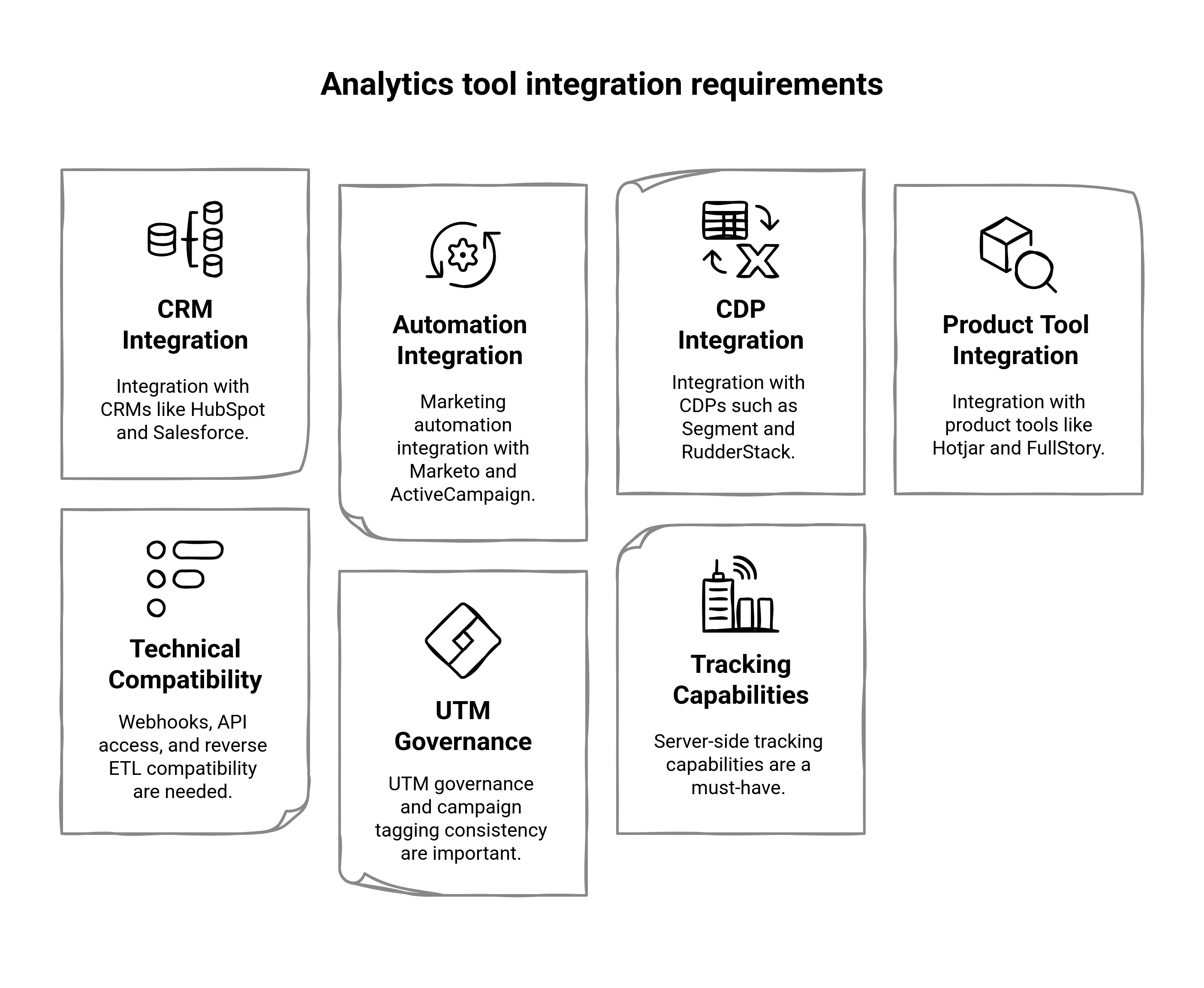
Regardless of how powerful your web analytics tool is in theory, it is only as good as its ability to fit seamlessly into your existing B2B SaaS stack. These silos and workflows exist because the marketing, product, and sales teams themselves don't communicate well with their respective customer success teams on how a particular team is using the system to gather insights into customer behavior. Here's an extensive checklist for integrating your analytics platform across your GTM engine.
CRM Integration: Fuel Sales and Lifecycle Visibility
Your analytics would enrich CRM in real-time to inform sales and customer success teams about customer account activities, intentions, and lifecycle stages.
Must-have compatibility: Salesforce, HubSpot, Pipedrive
Checklists:
Can you pass product usage events to CRM contact or account records?
Can you trigger playbooks or lifecycle emails based on behavioral data?
Is lead scoring now enriched with real-time engagement data?
Example: Link Amplitude to Salesforce via Segment to push "Activated User" or "Power User" events as contact triggers for outreach.
Marketing Automation Sync: Turn Data into Action Instead of Viewing
Bring behavioral data from your website analytics software into Marketo or ActiveCampaign, or Customer.io to enhance campaign intelligence and nurture campaign flows. Checklist items:
Does the tool push behaviour (e.g., “viewed pricing,” “downloaded whitepaper”) into automation flows?
Can it dynamically trigger audience re-segmentation based on engagement?
Is it possible to perform bi-dimensional synchronization with marketing tools?
Look for event-to-audience mapping capabilities to minimize manual data wrangling.
Product Tool Integration: Drive UX Optimization and In-App Messaging
Enhancing product experience analytics using tools like Hotjar, FullStory, Pendo, or Intercom with behavioral context and triggering real-time messaging. Checklist items:
Can you trigger in-app messages or surveys using usage milestones?
Does your analytics stack pass session-replay tools any custom events to add context?
Are you unifying rage-clicks, drop-offs, and scroll depth data with funnel analysis?
For example, integrating FullStory with Amplitude lets you drill into user sessions from specific churn cohorts.
Webhooks, API Access, and Reverse ETL Support
The framework of data access by SaaS analytics has evolved tremendously in support of advanced data workflows, especially when operationalizing analytics across internal systems or BI platforms. Checklist items:
Does the platform deliver a well-documented API for all event ingestion and export functions?
Does it support webhooks for triggering external systems or internal workflows?
Is it also integrated with Reverse ETL tools such as Hightouch or Census to sync insights back into CRM, Slack, or any other destinations?
This is particularly significant for enterprise teams that require actionability downstream or customized pipelines.
UTM Governance and Campaign Tracking Consistency
Attribution data becomes fragmented and unreliable without standardized campaign tagging. Checklist items:
Does your tool support custom UTM parameters so that consistent naming can be enforced?
Can you create lookup tables for campaigns and channel grouping?
Is there a process in place for auditing and cleaning bad or inconsistent UTM values?
Create a UTM convention library or a centralized spreadsheet and validate ingestion across analytics tools such as GA4 and Mixpanel, as well as your CRM.
Server-Side Tracking and Cookieless Future Readiness
With the phasing out of third-party cookies and stricter privacy limitations in browsers, server-side tracking is fast becoming a must-have. Checklist items:
Is your analytics platform hybrid or fully server-side?
Can it receive events from both the web and backend (e.g., purchases, logins)?
Is it future-proof for a cookieless and privacy-oriented web (GA4, Piwik PRO)?
Server-side tracking reduces losses in data and increases the credibility of the attribution, especially for longer sales cycles in B2B.
Privacy, Compliance, and Data Ownership in B2B Analytics
In the current global SaaS environment, data privacy and compliance are no longer simply boxes to tick; they are imperative strategic drivers. With hordes of applicable regulations, including but not limited to GDPR, CCPA, or HIPAA, and developing data residency and user consent requirements, there is more to a web analytics tool than simply analyzing behavior; it also needs to enact trust, minimize legal risks, and respect regional restrictions. Here is how one would evaluate analytics platforms from the standpoint of privacy, compliance, and data governance.

Hosting Models: Cloud, On-Premise, or Hybrid
The whereabouts of, and means of, hosting your analytics data correlate to the extent of legal exposure, especially for someone doing business across jurisdictions.
Cloud-hosted: Most SaaS analytics tools like Heap, Amplitude, or Mixpanel provide this type of access: scalable, less maintenance, and suitable for rapid launch. Possible issues arise with regulated industries or customers who have strict data localization policies.
On-premise: There are tools such as Matomo and Piwik PRO, which give full on-premise hosting, meaning that you have complete control over data storage, encryption, and retention. However, it requires IT infrastructure and internal security management.
Hybrid: Some of the platforms, like Piwik PRO hybrid cloud, allow you to store PII internally, using the vendor's cloud for other non-sensitive workloads; therefore, you achieve a good balance of flexibility and compliance.
Actionable Tip: Choose your hosting model keeping in mind the customer verticals, data sensitivity, and internal security posture. For healthtech, fintech, or govtech, self-hosted or hybrid may be non-negotiable.
Data Residency and Sovereignty: Where Is Your Data Truly Stored?
If one is a global SaaS provider, where one's data truly is in a physical sense-and, therefore, who governs that very data, will have come to mean much more than something that might be thought of as an afterthought.
Data residency drives the flagging of the geographic location where any data is being stored. Many tools give an option among geographically based storage in the EU, the US, or Asia, depending on customer demands.
Data sovereignty is the principle by which the data is governed by the laws of the country in which it is located. For example, US-hosted applications may be subject to the CLOUD Act, which may diverge from GDPR under certain circumstances.
Use case: An enterprise client based in the EU could expressly prohibit the storage of user data in the U.S. due to Schrems II ramifications. In such instances, analytics tools that offer EU-only data processing (e.g., Piwik PRO, Matomo, Plausible) are favored.
Consent Management and User Rights Workflows
In the modern world, which revolves around data analytics, one assumes that integrating tightly with Consent Management Platforms would be a prerequisite for any such software that respects user preferences across jurisdictions and channels.
Must-have integrations: OneTrust, TrustArc, Cookiebot, Quantcast.
Key capabilities to look for:
Consent-aware tracking (i.e., firing events after an opt-in only)
Dynamic consent banners per geography (GDPR, LGPD, CCPA)
Right of access/rectification/deletion of user data (Article 15-17 GDPR)
Audit logs for regulatory purposes.
Pro Tip: Check whether the tool provides for programmatic deletion or suppression of user data on request.
Running a Pilot: How to Test and Compare Tools Before Committing
Choosing the right web analytics tool is a high-stakes decision, especially in B2B SaaS, where data fuels everything from product roadmaps to demand generation to churn mitigation. A well-structured pilot phase helps you move beyond sales demos and documentation to experience the platform in your own environment. This is your chance to validate claims, uncover deal-breakers, and prove ROI before contracts are signed and stakeholders are locked in.
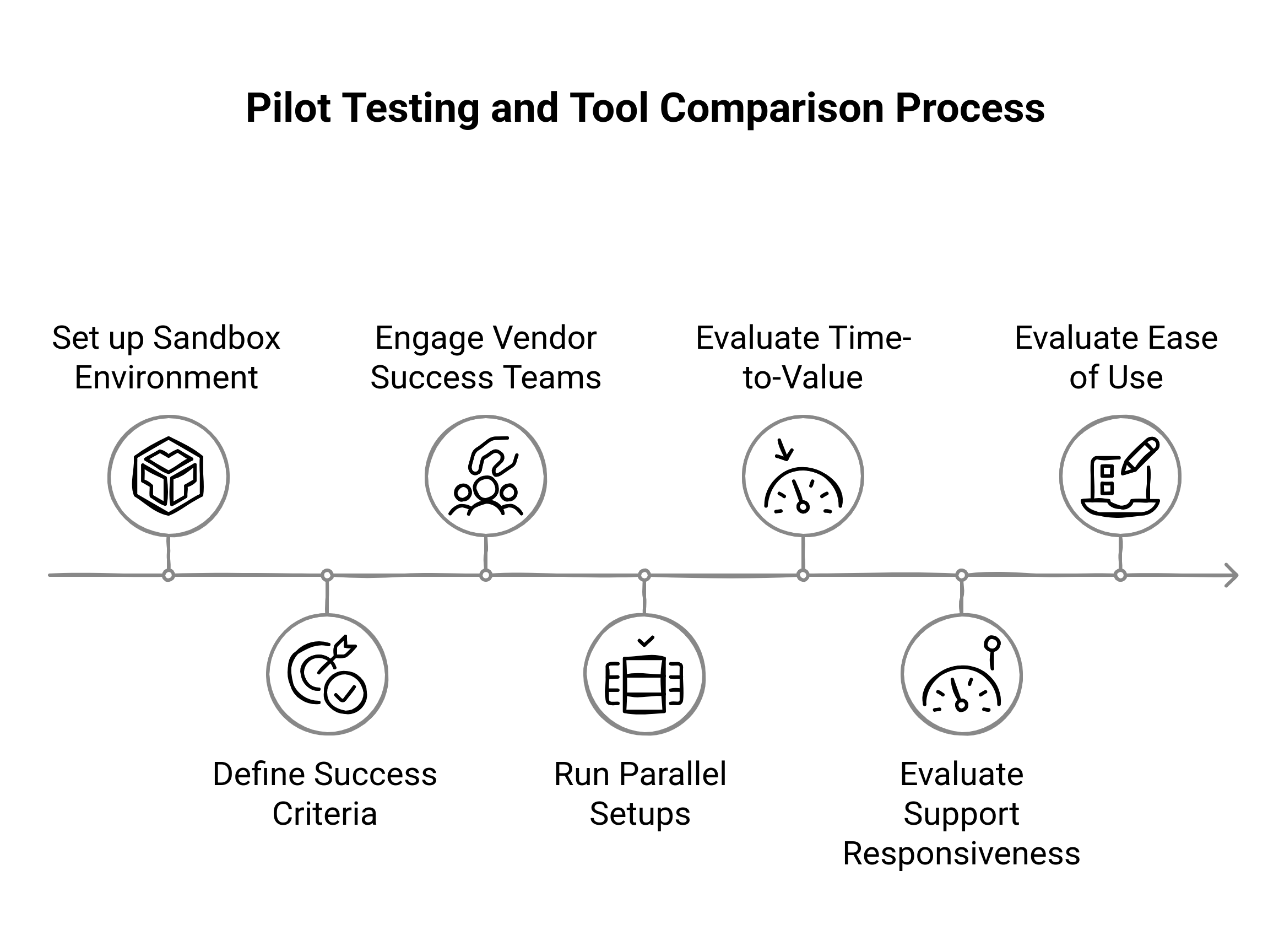
Here’s how to run a high-impact analytics pilot, without corrupting production data or wasting time on shallow tests.
Set Up a Dedicated Sandbox Environment
Avoid testing on your live production site, especially if you’re running multiple tools in parallel.
Best practice: Clone your staging environment and mirror traffic via split routing or selective tagging.
Tools to help: Tag Manager environments (Google Tag Manager, Segment Protocols), feature flags, or user-agent filtering.
Why it matters: Running dual analytics tools on the same live property often leads to inflated events, double counting, or tag conflicts. A sandbox gives you cleaner, isolated data.
Pro Tip: Use synthetic data (mock signups) to simulate key user flows if traffic volume is low.
Define Clear Success Criteria Before You Start
Before inviting vendor reps or developers into your pilot environment, get aligned internally on what success looks like. Otherwise, you’ll end up chasing vanity metrics or biased comparisons.
Key evaluation metrics:
Data accuracy: Are events triggering correctly? Are sessions and users consistent across tools?
Ease of implementation: How complex is the setup? How clean is the SDK or tagging logic?
Funnel clarity: Can you visualize multi-touch conversion paths and drop-offs meaningfully?
Segmentation depth: Can you slice data by industry, persona, or firmographic traits without SQL?
Customizability: Are dashboards and reports flexible enough for your GTM teams?
Time-to-insight: How fast can you go from setup to actionable visibility?
Ask the Right Questions During Vendor Onboarding
This is where you go beyond the brochure. Use the pilot period to engage the vendor’s success team as if you're already a paying customer.
Must-ask questions:
What’s the average implementation timeline for a company of our size?
Can we track both product-led and sales-assisted funnels out of the box?
Do you offer templates or prebuilt dashboards for B2B SaaS use cases?
How do you handle duplicate users across multiple devices or channels?
What’s your typical SLA for support or bug resolution?
Pay attention to how consultative the vendor is. If they deflect questions or throw documents at you, that’s a red flag for post-sale support.
Run Parallel Setups Without Corrupting Data
If you're testing more than one SaaS analytics tool—say, Heap vs Amplitude or GA4 vs Piwik PRO—you'll want to compare them head-to-head. But parallel tracking needs discipline.
How to do it right:
Use separate containers or APIs for each tool (e.g., separate GTM tags or Segment sources).
Avoid duplicate event names unless you're intentionally comparing payload structure.
Timebox your parallel test to a short, high-traffic window (1–2 weeks) to reduce noise.
Reminder: Don’t rely on absolute numbers (each tool processes sessions differently). Focus on directional insights, data integrity, and team usability.
Evaluate Time-to-Value, Support Responsiveness, and UX
Don’t just focus on analytics outputs—evaluate the experience of using the platform.
Time-to-value: How quickly did you move from the first tag fired to your first meaningful insight?
Support quality: How fast and knowledgeable were support reps when issues arose?
User interface: Can your non-technical team members explore funnels, cohorts, and dashboards confidently?
If one tool required five internal meetings and engineering firepower, while another let marketing launch experiments in a day, that’s a major decision factor.
Conclusion
In B2B SaaS, web analytics isn’t just a reporting layer—it’s the strategic engine behind customer acquisition, product iteration, sales enablement, and retention. Whether you're tracking product-qualified leads, optimizing multi-touch funnels, or enabling personalized experiences across buyer stages, your analytics platform shapes how you see, understand, and grow your business.
But not all web analytics tools are built for the complexity of B2B SaaS. The best tools go beyond surface-level metrics. They capture visitor-level behavior, support real-time segmentation, and integrate natively with your broader stack, without compromising on privacy, compliance, or data ownership. From early-stage startups needing lean, actionable insights to enterprise teams orchestrating GTM across global regions, the right tool is the one that aligns with your maturity, strategy, and operational model.
Ultimately, the goal isn’t just data collection—it’s decision acceleration. Run a pilot. Stress-test integrations. Push vendors to demonstrate value early. And when you do choose, choose a partner, not just a product. Because in SaaS, the teams that win aren’t the ones with the most dashboards—they’re the ones who turn analytics into impact, faster and smarter than anyone else.


